


Web-to-Print Platform & Software
All You Need to Know about a Web to Print Editor
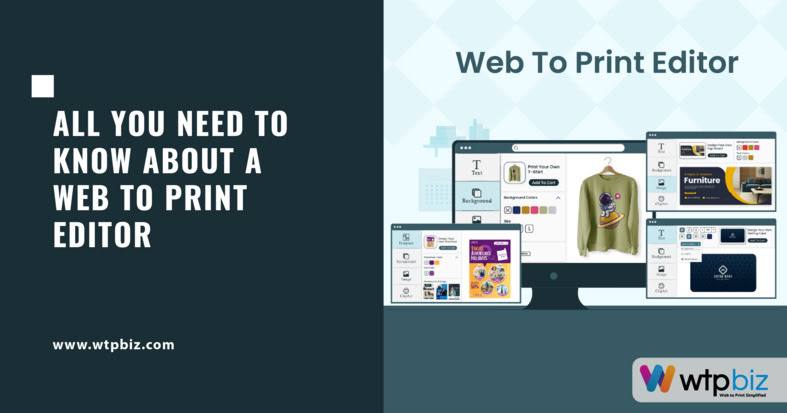
A Web to Print Editor is a crucial component within the realm of Web-to-Print software, facilitating seamless customization and design personalization. It empowers users to create and modify print-ready materials directly through a Web interface. This innovative tool streamlines the printing process, offering intuitive features for text, image, and template manipulation. Users can effortlessly craft personalized designs online, enhancing efficiency and reducing errors. To know more, let’s get started!
What is a Web to print Editor?
A Web-to-Print Editor is a key component in online printing, transforming the operations of print businesses.
Integrated into Web to print software, it enables users to design and customize print materials directly through a Web browser.
This technology facilitates a seamless and efficient solution for both print providers and their clients.
Users can create personalized designs for various print products with user-friendly interfaces and drag-and-drop functionality.
Customers can choose from predefined templates or start from scratch, tailoring each element to suit their preferences.
For print businesses, integrating a Web-to-Print Editor streamlines the ordering process, enhancing customer satisfaction and optimizing internal workflows.
The software brings advantages like increased efficiency, cost-effectiveness, and scalability for print businesses.
A Web-to-Print Editor enables easy management of diverse orders, accommodating individualized client needs while maintaining consistent quality.
This adaptability positions print providers to meet the demands of a dynamic market and expand their offerings to a broader customer base.
Leveraging Web to print software, it empowers users to create customized print materials, fostering an interactive and efficient relationship between customers and print providers.
As technology evolves, the role of the Web-to-Print Editors is likely to become even more integral in shaping the future of the printing industry.
How do I choose a good Web to print editor?

Choosing a good w2p editor is a critical decision for print businesses, and the market offers a variety of options, including Web-to-Print software as a Service (SaaS) solutions and custom web-to-print solutions. To make an informed choice, businesses should carefully consider their unique requirements and objectives.
1. Assessing Specific Needs:
The first step in choosing a w2p editor involves a thorough assessment of the business’s requirements and objectives.
For small to medium-sized print businesses seeking convenience and cost-effectiveness, web-to-print SaaS solutions are a viable option.
These cloud-based platforms offer accessibility, ease of maintenance, and automatic updates.
On the other hand, larger enterprises with specific design workflows may find custom web-to-print solutions better suited to their unique needs.
2. Compatibility and Integration:
The selected w2p editor solution should seamlessly integrate with existing systems and workflows within the print businesses.
Compatibility is crucial for a smooth transition and to minimize disruptions.
Whether it’s a SaaS solution or a custom one, the editor must align with the business’s current processes.
3. User-Friendly Experience:
The user experience is paramount.
A good w2p editor solution should be user-friendly, catering to both experienced designers and novices.
Intuitive design and navigation ensure that users can create prints effortlessly, enhancing overall efficiency in day-to-day operations.
4. Scalability for Growth:
Scalability is a key consideration, especially for businesses anticipating growth.
The chosen web2print editors should have the capacity to handle increasing demands as the print business expands.
Scalability ensures that the solution remains efficient and relevant over time, adapting to evolving business needs.
5. Design Flexibility:
A robust web2print editors must offer a wide range of design features. This includes variable data printing, template customization, and advanced design tools.
The flexibility in design options empowers print businesses to meet diverse customer preferences.
Thus, contributing to customer satisfaction and business success.
6. Support and Training Resources:
Beyond the technical features, the support and training provided by the web2print editors provider are critical.
A responsive support system ensures that any issues are promptly addressed, minimizing downtime and disruptions.
Comprehensive training resources are equally important, helping users unlock the full potential of the editor and maximizing its benefits for the business.
How does Web to print work?
Web-to-print revolutionizes the print industry by streamlining processes and enhancing efficiency for print businesses.
The Web-to-Print Online Designer is a key component of this technological evolution.
Traditional print processes involved manual interactions and longer turnaround times. But Web-to-print changes this by providing a virtual space for customers to engage directly with the design and ordering process.
The Online Designer empowers users to create and customize their print materials in real-time. Thus, fostering seamless collaboration between customers and print professionals.
This interactive interface eliminates the need for multiple revisions and reduces the chances of miscommunication. Thus, improving the overall efficiency of the design process.
The workflow involves customers accessing an online platform hosted by a print business. And interacting with the Web-to-Print Online Designer.
The platform offers a virtual workspace with design tools and templates. Thus, allowing users to choose from pre-designed templates or create their own designs easily.
Even individuals without graphic design expertise can craft professional-looking materials using the intuitive interface of the Online Designer.
Once the design is finalized, users can place print orders directly through the Web-to-print platform.
This integration of design and ordering streamlines the entire process. Thus, reducing the time from conception to completion.
print businesses benefit from increased operational efficiency, reduced overhead costs. And improved customer satisfaction through Web-to-print solutions.
What is a print editor?
A print editor, particularly within the context of a Web-to-print environment, plays a pivotal role in facilitating seamless and personalized printing experiences.
A Web-to-print print editor is an integral component of a software as a Service (SaaS) solution tailored to the printing industry, enabling users to create.
And modify, and personalize a wide array of printed materials directly through a Web interface.
custom web-to-print solutions leverage print editors to empower businesses and individuals to tailor their print collateral according to specific preferences.
The editor provides an intuitive platform with diverse design tools, allowing users to manipulate text, images, and layouts to suit their unique requirements.
One of the key advantages of a Web-to-Print Online Designer is its accessibility, as users can access the editor from any device with an internet connection.
Thus, breaking down geographical barriers and providing a user-friendly experience.
Moreover, the efficiency of the w2p editor solution contributes to cost-effectiveness and time savings, allowing users to preview their designs in real-time and minimizing the margin for error in the final print.
This democratization of the printing process fosters greater creativity and collaboration among users.
As businesses and individuals continue to embrace the convenience of on-demand printing.
The role of the print editor becomes increasingly indispensable in shaping the future of the printing industry.
What is the difference between print editing and Web editing?
1. Print Editing
Print editing focuses on traditional forms of publishing like newspapers, magazines, books, and brochures.
Key considerations in print editing include clarity, coherence, typography, layout, and design elements for physical print media.
Print editing operates within the constraints of a fixed format, offering a one-way communication channel from creator to audience.
Print editing, in contrast, often necessitates the production of a new edition for revisions.
2. Web editing
Web editing is centered around content for online platforms, Websites, and digital publications.
Web editing requires a focus on dynamic and interactive elements, including user experience, SEO, and responsiveness across devices.
Elements like hyperlinks, multimedia, and metadata are crucial aspects in Web editing to enhance user engagement and navigation.
Web editing allows for real-time updates, enabling instant corrections, additions, or removals of content.
Both share the goal of delivering high-quality content but differ due to unique requirements and constraints of their respective mediums.
How WTPBiz, the best Web to print software provider can help?
WTPBiz is a leading Web-to-Print (W2P) software provider, offering a comprehensive suite of solutions for businesses.
The web-to-print SaaS solution provided by WTPBiz redefines printing processes, offering a cloud-based platform for streamlined and efficient operations.
Accessibility is a key feature, allowing users to manage and customize printing projects from any location with an internet connection.
WTPBiz excels in providing custom web-to-print solutions tailored to the unique needs of each client.
These solutions include the creation of branded and user-friendly online storefronts, enhancing the ordering experience for customers.
Customization options extend to the user interface, design templates, and integration with existing systems.
The user-friendly interface of WTPBiz’s Web-to-Print simplifies the design process, catering to users with varying graphic design skills.
Features such as drag-and-drop functionality and advanced design tools empower users to bring their creative visions to life effortlessly.
WTPBiz’s commitment to customer support ensures businesses receive assistance for onboarding, troubleshooting, and ongoing support.
The goal is to facilitate a smooth and successful integration of Web-to-Print technology into the operations of businesses.
WTPBiz emerges as the best Web-to-Print software provider, prioritizing user-friendly design interfaces and dedicated customer support to maximize the potential of Web-to-Print Online Designer.
Conclusion
In conclusion, the Web-to-Print Editor stands as a pivotal tool in modern printing solutions, seamlessly bridging creativity and efficiency. As a dynamic platform, it empowers users to transform concepts into tangible, personalized prints. With its user-friendly interface and robust features, the Editor streamlines the design process, ensuring a seamless journey from ideation to production.
Web-to-Print Platform & Software
Web-to-Print Platform & Software
How to Sell Photobooks to Wedding Photographers (2026 Guide)
21/07-26
Web-to-Print Platform & Software
Photobook Pricing Guide: How to Price Photobooks for Maximum Profit
21/07-26
Web-to-Print Platform & Software
Travel Photobook Design Solution for Print Business: The Complete 2026 Guide
21/07-26

